Geofencing attendance works by drawing a virtual boundary around your gym's GPS coordinates. When a member or staff member opens the app within that boundary, the system records a check-in automatically — no front-desk queue, no register, no proxy. That is the short answer. It genuinely solves a narrow set of problems well. But GPS has physical limits, and without a matching policy, geofencing creates new headaches of its own. This post walks through what location-based attendance actually removes, where it reliably fails, and the policy you need alongside it.
How Does Geofence Check-In Actually Work?
A geofence is a GPS radius — typically somewhere between 50 metres and a few hundred metres — set around your gym's address. When a member opens the gym app inside that radius, the app logs a check-in timestamp and location. If they are outside the boundary, the app refuses to mark attendance.
The member does nothing special beyond opening the app on their phone. The gym gets a timestamped record tied to a real device and real GPS coordinates — not a register entry anyone could write for a friend.
Three things must be true for this to work reliably:
What Problems Does Geofencing Attendance Genuinely Remove?
Proxy attendance. The oldest problem in manual registers — one person signs in for five friends. A geofence check-in requires the member's own phone, logged into their own account, physically within the boundary. This alone is a meaningful improvement over a paper register or a shared PIN.
Front-desk queues at peak hours. When members self-check-in through an app, the front desk handles exceptions, not every arrival. A Monday-morning rush of forty members does not form a line waiting for a receptionist to tick names.
Disputed attendance records. "I was there, I just forgot to sign" is a common member complaint when fees are due or classes are counted. A geofenced timestamp is harder to dispute because it carries device ID, coordinates and time together.
Spreadsheet or register gaps. Registers go missing. Pages get torn. Staff forget to hand them around. A geofenced record is written to a database the moment the member checks in — no manual transfer, no transcription errors.
Where Location-Based Attendance Reliably Fails
Geofencing is a GPS technology, and GPS has physical constraints that no app can fully work around.
Indoor GPS drift. Smartphone GPS was designed for open-sky navigation. Inside a building — especially a gym with a metal roof or thick concrete walls — the signal bounces and drifts. A member standing at the squat rack may appear, to the GPS chip, to be thirty metres away. If your geofence radius is tight, that member cannot check in even though they are physically inside your gym.
Shared building problems. If your gym occupies one floor of a commercial complex, members on the floor above — or the café next door — may fall within your GPS boundary. With a loose radius, their location-based attendance is technically valid even though they are not on your floor.
Phone battery, permissions and app updates. Members with low battery often have location services switched off to save power. Some operating system updates reset app permissions silently. A member who genuinely attended cannot check in, creates a support ticket and blames your system.
Spoofing. GPS location can be faked on a rooted Android phone using mock-location apps. A motivated member who wants to mark attendance without attending can do so. Geofencing reduces casual proxy attendance; it does not eliminate deliberate spoofing.
Staff arriving early to open up. If a trainer arrives to unlock the gym before the geofence system's day starts, or if they check in from the parking area outside the boundary, their record is missing. This matters if you use attendance for commission calculations.
Example: Illustrative Comparison of Check-In Methods
| Method | Stops proxy? | Works without phone? | Survives indoor GPS drift? | Upfront hardware cost |
|---|---|---|---|---|
| Paper register | No | Yes | Yes | Nil |
| Geofence app check-in | Mostly | No | No | Nil |
| QR code at the door | Mostly | No | Yes | Low (tablet or printout) |
| Biometric (fingerprint / face) | Yes | Yes | Yes | Moderate |
Illustrative comparison; actual outcomes depend on your gym's layout, phone mix and implementation.
What Policy Must You Pair With Geofencing?
Geofencing without a written policy creates arguments. With a clear policy, members know what to expect and exceptions are handled consistently.
Set and publish the radius. Tell members the radius and that check-in must happen from inside the gym — not the car park, not the stairwell. Post this in the member welcome message and the app.
Define a check-in window. Decide how many minutes before and after a class a geofenced check-in is valid. A window that is too wide lets members check in and immediately leave.
Set the grace period for failed check-ins. GPS will occasionally fail a genuine member. Give members a way to flag a failed check-in — a WhatsApp message to the front desk or a note in the member app — within a defined window (say, the same day). Staff verify against CCTV or class records and correct the entry manually. This keeps the system honest without punishing members for their phone's GPS behaviour.
State the consequence for missed check-ins. If you use attendance to gate class credits, renewals or trainer-session counts, members need to know this in writing before they sign up, not when they first dispute a record.
Combine with at least one physical check. A QR code scan at the door, a biometric tap or even a staff head-count for classes gives you a corroborating record. Geofencing works best as one layer in a two-layer system, not as the sole source of truth.
Geofencing vs Biometric Attendance: Which Should a Gym Use?
Most gyms end up using a combination rather than choosing one.
Geofencing is low-cost to deploy — no hardware, no installation, just an app — and it works well for staff working at remote client sites or for outdoor fitness programmes where there is no door to put a device on. For a gym floor, it has the indoor-GPS problem described above.
Biometric devices — fingerprint scanners and face-recognition terminals — are accurate at the door because they do not rely on GPS at all. The member's fingerprint or face is checked against a stored template at the physical device. There is no drift, no battery issue and no permission problem. The trade-off is hardware cost and installation. For a permanent gym location, biometric attendance is the more reliable primary method.
Biometric attendance for gyms is worth reading if you are weighing the device options. For a breakdown of compatible hardware, the biometric machines page lists the eSSL and ZKTeco models that work with gym management software.
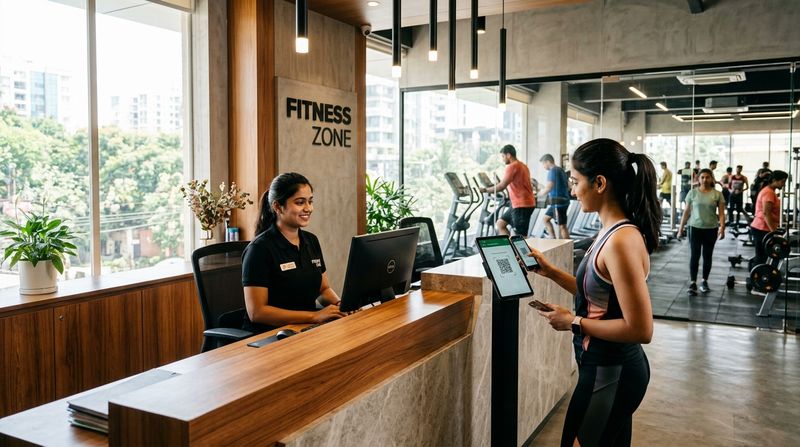
QR code check-in sits between the two: no device cost beyond a tablet or a printed code, works indoors, and requires the member's phone — but cannot confirm it is the right member's face or finger. The complete guide to QR attendance covers the setup in detail.
The practical answer for most Indian gyms: use biometric or QR at the door as the primary record and use geofencing (if your software supports it) as a secondary layer for members who miss the door check-in or for staff at satellite locations.
Building an Attendance Policy: A Checklist for Gym Owners
Use this before you switch on any location-based attendance system.
FAQs
What is geofencing attendance for a gym?
Geofencing attendance is a check-in method that uses a phone's GPS to confirm a member or staff member is physically within a set radius of the gym before logging their arrival. It removes the need for a front-desk register and makes proxy attendance harder to carry out.
Does geofence check-in stop proxy attendance completely?
Geofencing stops casual proxy attendance — one person signing in for another — because it requires the member's own phone and account to be inside the boundary. It does not prevent deliberate GPS spoofing on a rooted phone, so it reduces proxy attendance without eliminating it entirely.
Why do members sometimes fail to check in even when they are inside the gym?
Indoor GPS drift is the most common cause. Concrete walls, metal roofing and multi-storey buildings scatter GPS signals, so the phone's location estimate can be wrong by enough to fall outside your geofence radius. Low battery, revoked location permissions and outdated app versions also cause failures.
Is biometric attendance better than geofencing for a gym?
For a fixed gym location, biometric attendance — fingerprint or face — is more reliable than geofencing because it does not depend on GPS accuracy. Geofencing is a better fit for outdoor programmes, remote staff or situations where installing hardware at the door is not practical.
What policy should a gym publish alongside geofencing attendance?
At minimum, publish the check-in radius, the time window during which a check-in is valid, and the process for reporting a GPS failure. Tell members what a missed check-in means for their credits or membership before the system goes live, not after the first dispute.
How MyGymDesk Helps
MyGymDesk's biometric attendance feature connects your gym to compatible eSSL and ZKTeco devices, validates membership validity at the door and blocks expired members automatically on supported firmware — giving you a reliable, hardware-backed attendance record without depending on indoor GPS. Members can also check in with your gym's QR code through the Member app, and attendance data sits in the same workspace as memberships, billing and class bookings, so nothing needs to be reconciled across separate systems. Start your free trial — no credit card required — or book a demo to see how it works for your gym.