Does your front-desk staff spend the first 30 minutes of every morning manually ticking off attendance registers? Or worse — are members marking attendance for friends who haven't shown up? If you run a gym in India, you've likely dealt with both. Gym biometric attendance setup is the single most effective way to solve these problems — and with MyGymDesk, the entire process is surprisingly straightforward.
In this guide, we'll walk you through everything: from connecting your eSSL or ZKTeco device to configuring fingerprint and face recognition modes, syncing real-time check-in data with member profiles, and using that footfall data to make smarter operational decisions. Whether you manage a single gym in Pune or multiple branches across Chennai and Hyderabad, this is the setup playbook you need.
Why Gym Biometric Attendance Is No Longer Optional
Manual attendance is a liability. A staff member at the front desk can make errors, get distracted during peak hours, or simply not be present. Members can — and do — ask friends to check in on their behalf. This proxy attendance distorts your actual footfall data, which in turn affects decisions around staffing, class scheduling, and membership renewals.
Here's what gym owners across India are dealing with without a biometric system in place:
A proper biometric attendance system eliminates all of these. And when it's integrated directly with your gym management platform, the data becomes genuinely useful — not just a log, but a live operational dashboard.
Supported Devices: eSSL and ZKTeco Integration
MyGymDesk supports two of the most widely used biometric device brands in India — eSSL and ZKTeco. Both are readily available through hardware distributors in most Indian cities and are trusted across corporate offices, warehouses, and fitness centres alike.
eSSL Devices
eSSL is one of the most popular choices for Indian gym owners because of its affordability and local after-sales support. MyGymDesk integrates with eSSL's fingerprint and face recognition terminals using the standard SDK and API protocols. Popular models compatible with MyGymDesk include the eSSL E9, FaceID series, and MB series multi-biometric devices.
ZKTeco Devices
ZKTeco devices are widely used in larger gyms, fitness chains, and premium wellness centres. The brand is known for reliability and a broad product range — from basic fingerprint scanners to advanced face + palm vein recognition terminals. MyGymDesk supports ZKTeco integration across both fingerprint and face recognition product lines.
Before you purchase a device, confirm with your MyGymDesk account manager that your specific model is on the compatibility list. The team can also recommend the right device for your gym's size and budget.
Step-by-Step: Setting Up Biometric Attendance in MyGymDesk
Here is a complete walkthrough of the gym biometric attendance setup process inside MyGymDesk.
Step 1: Connect Your Device to the Network
Biometric terminals need to be on the same local network (LAN/Wi-Fi) as the system running MyGymDesk, or connected via a static IP that MyGymDesk can reach. Most gym owners use a wired LAN connection for reliability, though Wi-Fi works well for smaller setups.
Step 2: Add the Device in MyGymDesk
Once the device is online, log in to your MyGymDesk dashboard:
If you manage multiple branches, you can add a separate device for each location from the same dashboard. This is especially useful if you're already managing multiple gym branches and need centralised attendance visibility.
Step 3: Enrol Member Biometric Data
Once the device is connected, the next step is enrolling your members. There are two ways to do this:
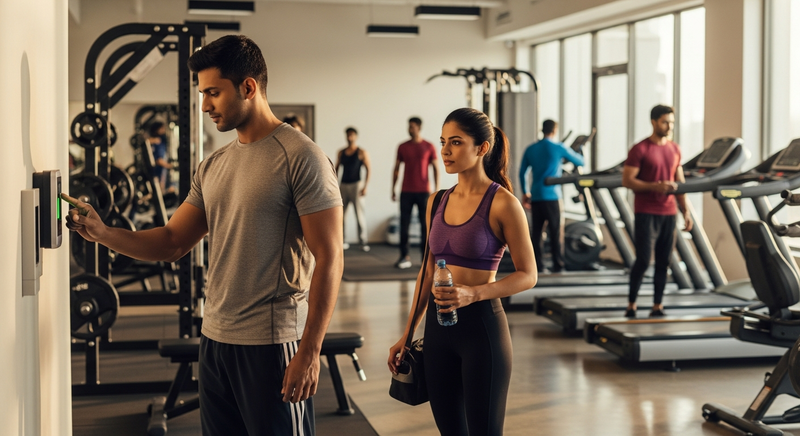
Option A — Enrol directly at the device: Walk each member to the terminal during their next visit and scan their fingerprint or face. The device assigns a unique biometric ID.
Option B — Bulk enrolment from MyGymDesk: For gyms with a large existing member base, MyGymDesk allows you to assign biometric IDs to member profiles in bulk and then sync them to the device. This is faster during initial setup.
Each member's biometric data is stored on the device itself; MyGymDesk only stores the mapped ID, not the raw biometric. This is important for data privacy compliance under Indian law.
Step 4: Configure Attendance Rules
With members enrolled, configure how attendance is recorded:
These rules ensure your attendance log stays clean and your footfall reports remain accurate.
Step 5: Sync and Monitor Real-Time Check-Ins
Once everything is configured, check-ins start flowing in automatically. Every time a member scans their fingerprint or face, the event is:
You can view live check-ins on the dashboard, pull historical attendance reports by member or date range, and even trigger automated actions — like a WhatsApp check-in notification to the member via WhatsApp automation.
Face Recognition vs Fingerprint: Which Should You Use?
Both modes work well, but there are practical differences worth considering for an Indian gym environment.
| Feature | Fingerprint | Face Recognition |
|---|---|---|
| Speed | Fast (~1 sec) | Very fast (~0.5 sec) |
| Hygiene | Contact-based | Contactless |
| Accuracy | Very high | High (lighting-dependent) |
| Cost | Lower | Slightly higher |
| Ideal for | Smaller gyms, budget setups | Large gyms, post-COVID preference |
Many gym owners in India are now opting for face recognition as the primary mode — contactless check-in is still a strong preference among members, particularly in urban metros. If your gym has poor lighting near the entrance, invest in a well-lit mounting point for the terminal; this dramatically improves face recognition accuracy.
How Biometric Attendance Connects With the Rest of MyGymDesk
This is where the real value shows up. Biometric check-in data doesn't sit in isolation — it feeds directly into the broader MyGymDesk ecosystem.
Member Profiles and Engagement Tracking
Every check-in is logged against the member's profile. When you open a member's record in member management, you can see their full attendance history — how many days they visited last month, their typical check-in times, and whether their attendance has been declining. This is powerful for spotting at-risk members before they go inactive. (If you're curious about the psychology behind member drop-offs, read why members go inactive after 3 months.)
Class Scheduling and Capacity Management
When a member checks in, MyGymDesk can automatically mark them as attended in any class they've booked. This eliminates the need for trainers to take manual roll calls during group sessions. Combined with class scheduling, you get a full picture of class utilisation versus actual attendance — useful for deciding which slots to expand or cut.
Automated Notifications and Renewals
If a member's attendance drops below a threshold you define, MyGymDesk can automatically trigger a re-engagement message via WhatsApp. Conversely, if a member's membership is about to expire, attendance data helps your front-desk team have a more informed renewal conversation. This connects naturally with your billing and invoicing workflows.
Staff Attendance (Yes, Really)
The same biometric device can be used to track staff check-ins as well. This integrates with staff management in MyGymDesk, giving you an accurate record of trainer and front-desk punctuality — without relying on honour systems or paper registers. If you manage payroll in-house, this data feeds directly into your payroll calculations too.
Practical Tips for a Smooth Biometric Setup
Here are some lessons learned from gym owners who've already completed their biometric attendance setup with MyGymDesk:
What Footfall Data Actually Tells You
Once your biometric system has been running for 4–6 weeks, you'll have genuine footfall data to work with. Here's how gym owners use it:
This is exactly the kind of data-driven decision making that separates growing gyms from stagnant ones. Pair it with the insights in using member data to grow your gym faster and you'll have a genuinely competitive edge.
Ready to Set Up Biometric Attendance at Your Gym?
Gym biometric attendance setup with MyGymDesk is not a complicated IT project — it's a one-time configuration that pays dividends every single day. From eliminating proxy check-ins to giving you real-time footfall visibility, the ROI shows up fast.
If you're starting from scratch and want to understand the full platform, explore MyGymDesk's gym management software to see how biometric attendance fits alongside billing, member management, class scheduling, and more. Or if you're ready to see it live, book a personalised demo and our team will walk you through the exact setup for your gym's device and configuration.
The register on your front desk has done its time. It's time to retire it.