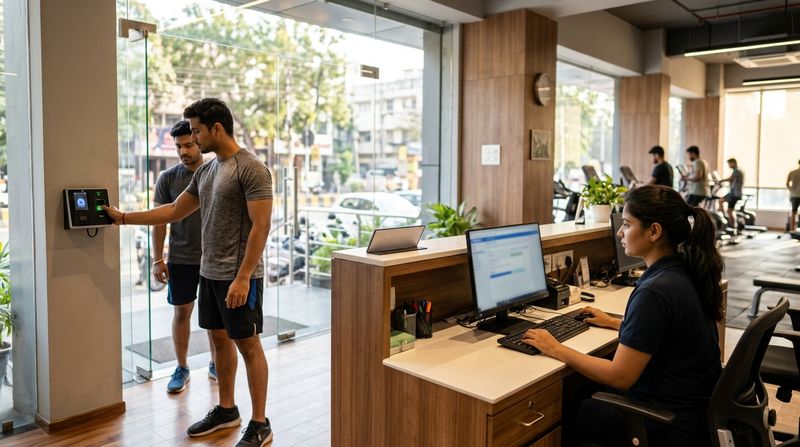
A gym attendance register records who entered your gym, when they arrived, and whether their membership was valid at the time. At its simplest it is a ruled notebook with six columns. At its most capable it is a biometric device that logs a check-in in under a second, blocks expired members at the door and feeds the data into your management software automatically. This post gives you a copyable format for paper and Excel, then explains exactly what changes — and what you gain — when you move to QR or biometric check-in.
The right format depends on your gym's size, your staff capacity and how much of that data you plan to actually use. All three options are covered below.
What columns should a gym attendance register include?
A good member attendance register needs six fields. These work whether you are using a physical register, a spreadsheet or a digital system.
| Column | What to capture | Why it matters |
|---|---|---|
| Date | DD/MM/YYYY | Lets you filter by day, week or month |
| Member name | Full name as on the membership | Prevents confusion between members with similar names |
| Membership ID | Your internal ID or phone number | Links the row to the member's file |
| Check-in time | HH:MM (24-hour clock is cleaner) | Shows peak hours; evidence of attendance |
| Check-out time | HH:MM, or leave blank if not tracked | Useful for capacity management |
| Membership valid till | DD/MM/YYYY | Lets staff spot an expired member at a glance |
| Remarks | Expired / Guest / PT session / Freeze | Flags anything that needs follow-up |
Keep the remarks column short. Train staff to use a fixed set of codes — "EXP" for expired, "GST" for guest, "PT" for personal training — so the column stays readable and searchable.
Copyable paper register format
Print or rule a notebook with these columns across a landscape A4 or A3 page. One row per check-in, one page per day.
Header block (top of each page)
Gym name: ___________________ Date: ___/___/______ Page: ___
Column headers
| # | Member Name | Member ID | Check-In | Check-Out | Valid Till | Remarks |
Leave roughly 3 cm per row. Number each row so the total entries for the day are obvious at a glance. At the end of each day, write the total check-ins at the bottom of the page, then sign and date it. Store completed registers for at least three years in case of a membership dispute.
Gym attendance Excel sheet: a ready-to-build template
An Excel or Google Sheets register does everything the paper version does and adds filtering, pivot tables and automatic expiry flags. Here is how to build it in under ten minutes.
Sheet structure
Create one sheet per month. Name the tabs Jan-26, Feb-26, and so on.
Row 1 — Column headers (freeze this row)
Date | Member Name | Member ID | Phone | Check-In | Check-Out | Valid Till | Days to Expiry | Remarks
Useful formulas
=G2-TODAY() — format as a number. Negative means expired.=COUNTIF(A:A, A2) after grouping by date, or use a pivot table with Date as rows and Count of Member ID as values.Limitations to know before you rely on Excel
An Excel register is a solid step up from paper but it still needs a person to maintain it. That person becomes a single point of failure.
What changes with QR check-in?
With a QR-based system, each member scans a code — either a fixed code posted at the entrance or a code in their member app — and the check-in is logged instantly with a timestamp.
What you gain over paper and Excel
What to watch
MyGymDesk's QR attendance feature generates a gym QR code that members scan on arrival. The check-in appears in the member's profile and in your dashboard immediately. Members who do not have smartphones can be checked in manually by staff from the Business app in seconds.
What changes with biometric check-in?
Biometric check-in — fingerprint or face recognition — removes the member from the check-in process almost entirely. The device reads the biometric, confirms the match in a fraction of a second and logs the entry. No phone, no card, no code to remember.
Key differences from QR
What to plan for
For a detailed walkthrough of setting up a biometric device at your gym, see Gym Biometric Attendance Setup With MyGymDesk.
MyGymDesk works with compatible eSSL and ZKTeco fingerprint and face recognition devices. The full list of supported devices is on the biometric machines for gyms page. The biometric attendance feature syncs membership validity to the device automatically, so expired members are blocked without any staff action on supported firmware.
Paper vs Excel vs QR vs Biometric: a comparison
| Factor | Paper register | Excel sheet | QR check-in | Biometric |
|---|---|---|---|---|
| Setup cost | Negligible | Negligible | Software subscription | Device + software |
| Staff effort per check-in | High (manual entry) | Medium (typed entry) | Low (member self-serves) | Minimal |
| Accuracy | Low (errors, skipped rows) | Medium (formula errors, stale data) | High | Very high |
| Identity verification | None | None | Low (code can be shared) | High |
| Expired member flag | Manual check | Conditional format | Automatic (if data is current) | Automatic at device level |
| Searchable history | No | Yes (pivot table) | Yes (dashboard) | Yes (dashboard) |
| Works without internet | Yes | Yes (local file) | No | Partly (device buffers, syncs later) |
How to migrate from a paper register to digital attendance
Moving from paper to digital does not have to happen overnight. This four-step approach works for most gyms.
For a broader look at why the transition from spreadsheets is worth making, see Why Indian Gyms Struggle to Move From Excel to Software.
Example: Illustrative daily attendance summary (not real data)
The table below shows what a day's attendance summary might look like in a gym management dashboard. All figures are illustrative.
| Metric | Illustrative value |
|---|---|
| Total check-ins (Monday) | 87 |
| Peak hour | 06:00–08:00 |
| Expired membership attempts | 3 |
| Members with membership expiring within 7 days | 11 |
| PT sessions logged | 14 |
With a paper register, extracting this summary would take a staff member most of an hour. With a digital system, it is available the moment the last member checks in.
How MyGymDesk helps
MyGymDesk's biometric attendance feature connects with compatible eSSL and ZKTeco devices to log every check-in automatically, sync membership validity to the device and block expired members at the door on supported firmware — with no manual work from your staff. QR check-in is also built in for gyms that prefer a device-free setup. Every check-in appears immediately in the member's profile and in your attendance dashboard, so you always know who came in, when, and whether their membership was current. Start your free trial or book a demo to see it in action.
FAQs
What is the standard format for a gym attendance register?
A gym attendance register should have at minimum seven columns: date, member name, membership ID, check-in time, check-out time, membership valid till, and remarks. This applies whether you use a paper notebook, an Excel sheet or a digital system.
Can I use Excel as a gym attendance sheet?
Yes. An Excel or Google Sheets register with a frozen header row, a "Days to Expiry" formula and conditional formatting for expired memberships is a practical step up from paper. The main limitation is that data must be entered manually and can go out of date if membership records are not kept in sync.
What is the difference between QR and biometric attendance for a gym?
QR attendance lets members scan a code to log their check-in; it is quick and low-cost but a code can be shared. Biometric attendance uses a fingerprint or face scan to confirm identity; it cannot be shared and on supported firmware can block expired members at the device itself without any staff action.
How long should a gym keep its attendance register?
There is no single statutory period for gym attendance records in India, but keeping registers for at least three years is a reasonable practice to handle membership disputes, insurance queries or any regulatory check. Confirm the appropriate retention period with your lawyer.
Does a gym attendance register need to show membership validity?
It is strongly recommended. Knowing at a glance whether a member's plan was valid on the day they visited protects the gym in a dispute and helps front-desk staff catch expired memberships before they become a revenue problem. A "Membership valid till" column does this for paper and Excel; digital systems flag it automatically.