The request arrived the same way for years, from studio after studio: "we run some classes online, and the link is the worst part of our week."
Not the teaching. Not the camera. The link. Creating it, sending it, re-sending it to the person who missed the message, explaining to a member that the one they saved was last month's, and doing all of that again at six in the morning because that is when the class is.
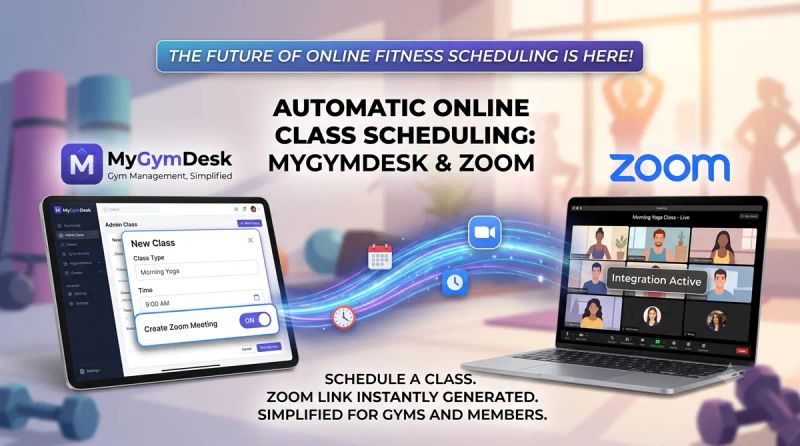
Online classes and personal training are now built into MyGymDesk, with Zoom connected directly. Mark a session as Online and the meeting is created for you. Members who booked tap Join in the app. Nobody copies a link.
What it does
You connect your own Zoom account once, through Zoom's own consent screen. There are no API keys to find, and the meetings are created inside your account — your sessions, your recordings, your Zoom.
After that, the workflow is a single change to how you already schedule:
Mark a class or PT session as Online. The Zoom meeting is created automatically in your account.
A recurring class becomes a recurring meeting. One link works for the whole series, so a member who saves it in January is still using the right one in March.
Members join from their booking. A Join button appears on the booking in the member app with a countdown, and becomes active 15 minutes before the session starts. Only members booked into that session can see it — the link is not posted anywhere public.
Trainers start as host from their own schedule. No shared Zoom password, and the host link is never shown to a member.
Reschedules and cancellations stay in sync. Move an online session and the meeting moves with it. Cancel it, and the meeting is removed — no stale link sitting in a group chat for somebody to find three weeks later.
Reminders carry the link. The WhatsApp reminder for an online class is the message that gets members into it, rather than a separate one they have to go looking for.
It works for group classes and for one-to-one personal training, and it sits inside everything else you already run — the same members, the same plans, the same bookings, the same payments. It is not a second system with a second list of names.
A Zoom Marketplace app
MyGymDesk is published on the Zoom App Marketplace as an unlisted app, which means it has been through Zoom's review process. In practice that matters for two reasons.
The first is how you connect. You authorise MyGymDesk from Zoom's own consent screen and you can revoke that access from your Zoom account at any time, the same way you would any other connected app. We never ask for your Zoom password.
The second is what we do with the connection. We create and update meetings for sessions you mark as Online, and nothing else. The host link that starts a meeting is fetched at the moment a trainer clicks Start and is never stored, never logged, and never sent to a member.
To be precise about what this is and is not: it is a Marketplace listing that has passed Zoom's review. It is not a partnership, and Zoom does not endorse MyGymDesk.
What Zoom's own limits still mean for you
We would rather say this here than have you discover it in front of a class, because these belong to your Zoom account and no scheduling software can remove them.
Scheduling online sessions in MyGymDesk is unlimited. What happens inside Zoom is governed by your Zoom plan. Two limits are worth knowing before you build a timetable:
Zoom's free tier ends almost all meetings at 40 minutes — one-to-one sessions included, which surprises studios running online PT. If you sell a 60-minute class, the person hosting it needs a paid Zoom licence.
A single Zoom account hosts one meeting at a time. Zoom's documentation is explicit that a Basic or Licensed user on a Pro account is limited to hosting one meeting at a time; two at once requires a Business, Education or Enterprise licence. So two teachers cannot both go live at 7 AM from one account. MyGymDesk warns you when a new online session overlaps another one, so you find this out while building the timetable rather than at 6:59 in the morning.
There is one more worth mentioning because it arrives late and quietly: Zoom caps a recurring meeting at 50 occurrences, which a weekly class reaches in just under a year. MyGymDesk splits a longer series automatically and resolves each date to the correct link, so a member booking in month eleven is not the person who discovers the cap.
None of these are reasons not to run online classes. They are reasons to spend twenty minutes on your Zoom setup before you sell an online membership. We have written up the Zoom limits worth knowing in full.
Who this is for
Yoga and pilates studios with members who travel, or who moved cities and stayed. Dance studios running weekday batches for people who cannot reliably reach the studio by 7 PM. Personal trainers whose clients are consistent for three weeks and then away for one. Fitness studios that kept a few online batches after 2020 and have been running them on WhatsApp links ever since.
The common thread is not that online replaces the room. It is that a member who cannot attend this week has somewhere to go other than out of the habit entirely — and that is usually the difference between a plan that renews and one that quietly lapses.
Not ready to connect Zoom?
You do not have to. Paste your own Google Meet or Teams link onto a session and MyGymDesk shows it to the members booked into it, with the same Join button in the same place. The difference is that we do not create or update that link for you — if the meeting moves, you move the link.
It is a reasonable way to start if your studio already lives in Google Workspace.
Getting started
If you already use MyGymDesk, connecting Zoom takes about a minute from Settings, and the first class you mark Online will have a meeting waiting for it. The Zoom integration page walks through the setup, and the online classes and PT page covers what members and trainers see.
If you are new to this and want to get the fundamentals right first, start with how to set up online classes and how recurring links work. If you are weighing up running both formats from one timetable, what hybrid classes actually take is the honest version.
Or book a demo and we will set it up against your real timetable, clashes and all.