Teaching Pilates online works well when you solve three problems early: members cannot see your hands, you cannot correct with touch, and a flat camera robs the movement of its depth. Solve those three and an online Pilates class can be just as precise as one in the studio. This guide walks through the practical craft — framing for mat work, building a verbal cueing library, and the minimum kit that earns its cost — so you can run online Pilates classes confidently from your next session.
The sections below also cover scheduling, member communication and a simple checklist to run before every class goes live.
What Camera Angle Works Best for Online Pilates?
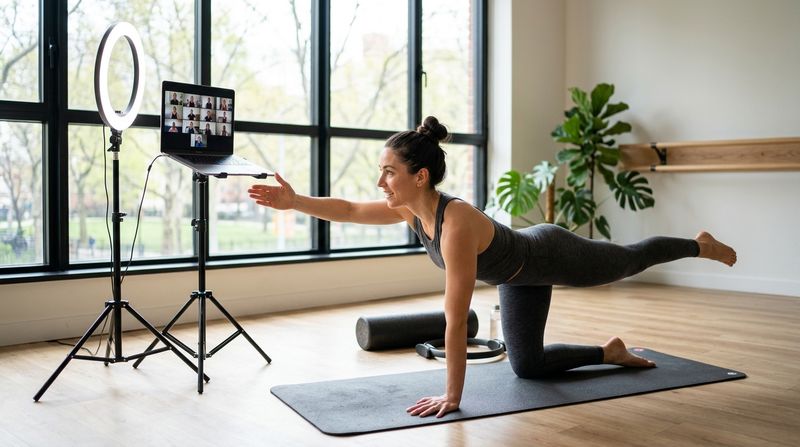
A single fixed camera almost never shows everything. The angle that works for a side-lying leg series is wrong for spine articulation and completely wrong for footwork. Use two positions and switch between them by rotating or repositioning the device on a tripod, or invest in a second camera.
The two angles that cover mat work
Side profile angle (90° to the mat): This is your primary position for nearly all mat Pilates. Place the camera at mat height — not desk height, not standing height — so members see your spine, pelvis and limbs in true profile. Roll-Up, Roll-Over, Swan, Single Leg Stretch and Side-Lying series all read clearly from here. A camera at eye level from a standing position cuts off the pelvis and makes neutral spine invisible.
Overhead or front-facing angle: Use this for exercises where rotation or symmetry matters — Criss-Cross, Saw, Open Leg Rocker. A front-facing camera placed low (roughly 30–40 cm off the floor) also lets members watch foot and arm alignment in Teaser. If you only have one device, mark two floor spots with tape so you can move it consistently every session.
Framing rules that help members copy you
How Do You Cue Pilates Without Using Touch?
In a studio you might place a hand on a member's sacrum to cue posterior tilt, or tap a rib to close a flare. Online, every correction must travel through words, demonstration or visual reference. Build a verbal cueing library around three channels: anatomy landmarks, sensation and imagery.
Anatomy landmark cues
Name the body part precisely so the member knows where to direct attention.
Precise landmark cues are especially useful for new members who have not yet built body awareness, which is common in online Pilates classes where you attract beginners who are trying Pilates for the first time.
Sensation cues
Tell members what they should feel, not just what they should do.
Ask members to confirm with a thumbs-up or a nod. This gives you real-time feedback without tactile correction.
Imagery cues
Imagery shortens the gap between instruction and movement. Keep images concrete and culturally familiar.
A simple cueing sequence for every exercise
Running this sequence consistently means members know what is coming and can self-correct more quickly.
What Is the Minimum Kit for Teaching Pilates Online?
You do not need a broadcast studio. You need equipment that removes the most common failure points: shaky video, poor audio and bad light.
| Item | Why it matters | Budget approach |
|---|---|---|
| Tripod with phone mount | Holds the camera at mat height; removes shake | A basic adjustable tripod with a phone clip |
| External microphone (clip-on lapel) | Built-in laptop mics pick up room echo; members miss breath cues | A clip-on mic that plugs into your phone or laptop |
| Ring light or a north-facing window | Flat overhead light flattens the body; side light shows spinal curves | Position a window to your side; a ring light is a backup for evening classes |
| Second device (optional but useful) | Allows a second angle without repositioning | An old phone on a separate stand works |
| Stable broadband or mobile data | Video freezes break cueing flow | Test upload speed before each session |
| Non-slip mat with a distinct colour | Members mirror you; a visible mat edge gives spatial reference | Any contrast-coloured mat |
What you do not need: a dedicated camera, professional video editing, a green screen or a purpose-built studio space. A cleared living room or a quiet corner of your studio floor is enough.
How Should You Structure an Online Pilates Class?
Structure matters more online than in person because members cannot read your body language as easily, and small distractions (a notification, a delivery at the door) can pull them out of the session.
A 45-minute class template
How Do You Keep Online Pilates Members Coming Back?
Retention in online Pilates classes depends on three things: consistent scheduling, timely reminders and a clear way for members to book and manage their own place.
For a deeper look at filling classes and reducing empty spots, the guide on how Indian gyms can fix overbooking in group classes applies directly to online sessions too.
Pre-Class Checklist for Online Pilates Instructors
Run through this before every session goes live:
How MyGymDesk Helps
MyGymDesk's class booking software creates a Zoom session automatically when you schedule an online class, so you never have to set up a meeting manually or paste links into a group chat. Members book their own place from the member app or portal, the waitlist moves automatically when a spot opens, and WhatsApp reminders go out without any extra work from you. You can run your online Pilates timetable alongside your in-studio schedule from the same screen. Try it free — no credit card needed — or book a demo to see it set up for a Pilates studio.
FAQs
What is the best camera angle for teaching Pilates online?
A side-profile angle at mat height (camera placed roughly 30–40 cm off the floor, at 90° to your mat) is the most useful single position for mat Pilates. It makes spinal alignment, pelvic position and limb length visible. Add a front-facing low angle for rotational or symmetry-focused exercises.
How do you correct Pilates students online without touch?
Use three types of verbal cue in sequence: anatomy landmark cues (name the exact body part), sensation cues (describe what the student should feel), and imagery cues (give a concrete mental picture). Ask for a visual signal — thumbs-up, nod — so you know the correction has landed.
What equipment do I need to teach Pilates online?
The minimum that makes a real difference: a tripod with a phone mount, a clip-on lapel microphone, and good side lighting (a north-facing window or a ring light). A contrast-coloured mat and a cleared background cost nothing and help members mirror you accurately.
How do I reduce no-shows in online Pilates classes?
Fix a consistent time slot so members build a habit, send a reminder the evening before and again an hour before class, and make booking self-serve so joining is frictionless. A waitlist keeps classes full when cancellations arrive at short notice.
Do online Pilates classes need a separate timetable from in-studio classes?
They can share the same timetable if your software supports it. Running both from one schedule makes it easier to manage instructor time, avoid double-booking and give members a single place to see all available sessions. See how this works in practice in the guide on hybrid fitness classes: running both from one timetable.