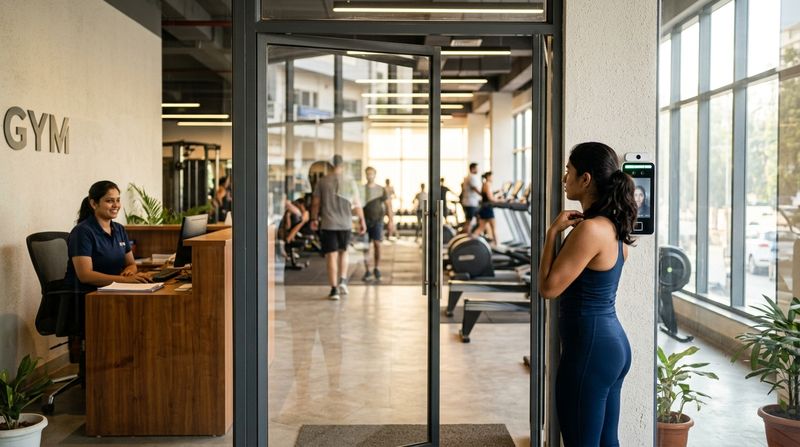
For most Indian gyms, a fingerprint device is the default choice—but face recognition machines are increasingly worth considering, especially at high-traffic doors. The short answer: fingerprint works well in smaller gyms where members keep their hands dry; face recognition handles peak-hour queues faster and avoids hygiene concerns but needs adequate lighting and a slightly higher upfront budget. This guide covers every factor that matters on the gym floor—speed, sweat, masks, door-lock control, offline behaviour, capacity and how your gym management software ties it all together.
Use the checklist table near the end to score both options against your own gym's conditions before you purchase.
Does a Sweaty or Worn Fingerprint Affect Attendance Accuracy?
Yes—and it is one of the most common complaints from gym owners in India. Members arrive from the cardio floor or a HIIT batch, their fingertips are moist or calloused, and the sensor either rejects them or takes three attempts.
The core issue is that most optical and capacitive fingerprint sensors read the surface pattern of a fingertip. Sweat, chalk, cuts or years of weight training can distort that pattern enough to cause a false rejection. At a busy gym this creates a queue at the door and frustration that your front-desk staff end up managing manually.
What you can do if you stay with fingerprint:
Face recognition bypasses this entirely. The camera reads facial geometry, which does not change with sweat, chalk or gloves.
How Does Face Recognition Handle Masks and Poor Lighting?
This is the counterpart concern for face recognition devices. Most current-generation infrared (IR) face recognition machines cope well with partial masks but struggle more with full face coverings. If your gym is in a cold region or members habitually wear buffs or face masks, check whether the device you are considering supports mask-mode recognition—many mid-range and above devices now do.
Lighting matters more for visible-light cameras than for IR sensors. An IR device works in near-darkness and is not thrown off by direct sunlight through a glass door. A visible-light camera can wash out in bright sun or fail in a dim corridor. Always ask the vendor whether the sensor is IR or visible-light, and test it at the actual installation spot at different times of day before you commit.
Practical tip: Mount the device at a height that matches the median height of your members (roughly eye level), away from a window that faces east or west.
Which Is Faster at Peak Hours?
Face recognition is faster in practice. A well-configured face recognition device can authenticate a member in under a second with no contact required—members walk up, glance at the screen and pass through. With fingerprint, even a clean, dry scan takes a second or two, and a retry doubles that.
At peak hours—typically the morning batch changeover and the evening rush—a two-second difference per person multiplied across many members creates a visible queue. If your gym runs back-to-back batches with a tight changeover window, face recognition keeps the door moving.
Fingerprint is perfectly adequate for gyms where members arrive in a spread-out pattern, or where the entrance has two lanes and two devices.
What About Hygiene?
A contactless face recognition device is more hygienic: members never touch the sensor. This matters in a gym environment where the same sensor is touched by dozens or hundreds of people every day.
Fingerprint devices should be cleaned regularly with an alcohol wipe. Many gym owners underestimate how quickly a shared sensor accumulates grime. This is a small operational task, but it is one to plan for.
Capacity: Users and Templates
Every biometric device has two limits you must check before purchasing:
For a small gym with a few hundred active members, most mid-range devices are adequate. For a larger fitness centre or a multi-batch club where you cycle through thousands of members over a year, you need a device with a larger local store—or a system that pushes only active memberships to the device, freeing up space automatically.
This is exactly the model MyGymDesk uses: biometric attendance syncs membership validity to compatible eSSL and ZKTeco devices, so only members with an active membership are held on the device. Check the supported models at /biometric-machines.
Door-Lock and Turnstile Control
A biometric device on its own is an attendance recorder. A biometric device wired to an electric lock, a turnstile or a flap barrier is an access-control system. Before you buy, decide which you need.
Questions to ask the vendor:
Face recognition devices tend to have the same lock-output options as fingerprint devices, so this is not a deciding factor between the two types—it is a check you must do for either.
How Does the Device Behave Offline?
Every biometric device stores templates and logs locally. If your internet goes down, the device keeps working and keeps recording check-ins. When the connection is restored, the logs sync to your software.
What varies between devices and software platforms is what the device enforces offline:
With MyGymDesk on supported firmware, membership validity is pushed to the device. On those firmware versions, the device can block an expired member even without a live internet connection, because the expiry date is stored locally. Confirm with the vendor whether your chosen device and firmware version support this behaviour—not all firmware revisions do.
This is a critical question for gyms where the entrance is unmanned for part of the day.
Cloud and Software Sync: What to Look For
A biometric device that logs attendance locally but never syncs to your gym management software is just a standalone register. You want two-way sync:
Without this two-way link, your front-desk staff end up doing the same data entry they did with a paper register—just in a different place.
MyGymDesk connects with compatible eSSL and ZKTeco devices. Member enrolment in MyGymDesk pushes the record to the device; when a membership expires, the access is revoked on supported firmware. Attendance logs flow back into the member's profile automatically, so you can see attendance gaps without running a manual report.
For a full walkthrough of setup, see the guide on gym biometric attendance setup with MyGymDesk.
How Are Expired Members Handled?
This is the question most gym owners forget to ask before buying. A device that lets expired members walk in quietly is costing you revenue every single day.
The correct behaviour is:
On supported MyGymDesk firmware, this happens automatically. Staff are not required to manually delete or suspend records on the device. This closes a common revenue leak described in the post on how gym software can cut revenue leakage for small gyms.
Buying Checklist: Face vs Fingerprint for Your Gym
Use this table to compare the two technologies against the conditions in your gym. Score each factor for your situation before you finalise your order.
| Factor | Fingerprint | Face Recognition | What to check |
|---|---|---|---|
| Sweaty or calloused members | Higher rejection risk | Not affected | Ask about sensor type; enrol multiple fingers |
| Hygiene | Contact surface, clean regularly | Contactless | Plan a daily wipe routine for fingerprint |
| Peak-hour speed | 1–3 seconds per person | Under 1 second | Count your peak-hour throughput requirement |
| Masks and face coverings | Not affected | Check mask-mode support | Test before buying |
| Lighting sensitivity | Not affected | IR sensor preferred | Test at installation spot, different times of day |
| User and template capacity | Check spec sheet | Check spec sheet | Match to active member count, not total enrolled |
| Door-lock / turnstile output | Wiegand/relay available on most | Wiegand/relay available on most | Confirm voltage/current for your lock |
| Offline behaviour | Stores logs locally | Stores logs locally | Confirm whether expiry is enforced offline |
| Software sync (two-way) | Supported on compatible devices | Supported on compatible devices | Confirm device is on the supported list |
| Expired member blocking | Supported on compatible firmware | Supported on compatible firmware | Confirm firmware version |
| Enrolment effort | 2–3 fingers per member | One face scan per member | Face enrolment is faster for large rosters |
| Typical installation complexity | Low | Low to moderate (lighting, height) | Ask vendor for a site visit before mounting |
All descriptions above are general characteristics of device categories. Actual performance depends on the specific device model and firmware.
How MyGymDesk Helps
MyGymDesk connects with compatible eSSL and ZKTeco biometric devices—both fingerprint and face recognition—to give you two-way sync between your gym's attendance hardware and your member records. Membership validity is sent to the device, and on supported firmware, expired members are blocked at the door without any manual intervention. You can see every member's attendance history inside biometric attendance without running a separate report. Check the full list of supported devices at /biometric-machines, then book a demo to see the sync in action.
FAQs
Which is better for a gym—face recognition or fingerprint attendance machine?
Face recognition is faster at peak hours, is contactless and avoids the false-rejection problems caused by sweat or worn fingerprints. Fingerprint devices are adequate for smaller gyms with a spread-out arrival pattern and are generally simpler to install. The right choice depends on your peak-hour traffic, your members' typical hand condition and your lighting at the entrance.
Can a biometric attendance machine block expired members automatically?
Yes, on supported devices and firmware versions. When a membership expires in your gym management software, the software pushes the change to the device and the device denies entry. With MyGymDesk, this happens automatically on compatible eSSL and ZKTeco devices running supported firmware—no manual deletion required on the device side.
Does a biometric device work if the internet goes down?
All biometric devices store templates and attendance logs locally, so they continue to record check-ins without an internet connection. Logs sync back to your software when connectivity is restored. Whether the device enforces membership expiry offline depends on the device firmware—confirm this with your vendor before purchasing.
How many members can a biometric device store?
Every device has a published user capacity and a template capacity. These figures vary by model and must be checked against your active member count before you buy. If your gym management software pushes only active memberships to the device and removes expired records automatically, you can stretch the device's capacity further.
Does face recognition work if a member is wearing a mask?
Many current-generation infrared face recognition devices include a mask-mode that can authenticate members wearing a partial face covering. Full face coverings remain a challenge for most devices. Test the specific device in mask-mode at your entrance before committing to a purchase.